Sunday, 28 May 2023

Page Speed

Page speed refers to the measurement of how quickly the content on a webpage loads, specifically the time it takes for the complete display of the content. Elements such as HTML code, CSS, JavaScript files, images, videos, and other multimedia components impact the page speed. Pages that have longer loading times tend to experience higher bounce rates, lower average time spent on the page, and decreased conversions. Additionally, slower-loading pages tend to rank poorly on search engine result pages.

To improve page speed, consider the following steps:

Begin by measuring the speed of your pages using tools like PageInsight, GTMatrix, or similar tools. These tools can provide insights on areas that need improvement to enhance page speed. Dynatrace is another tool that can be utilized.

If you are using a popular framework or content management platform, consult their documentation for performance optimization best practices.

The following recommendations can have a significant impact on reducing page load speed:

  • Optimize images and videos: Images, graphics, photos, and videos enhance user engagement but often consist of large files that can slow down a website. Reduce image file size by sending appropriately sized images at the correct resolution for the user's screen. Compress images using formats like JPG. Compress videos using video compression tools to improve speed.
  • Progressive image loading technique: Implement progressive image loading to prioritize the display of visible content and delay the loading of images below the fold.
  • Serve images in next-gen formats: Utilize next-generation image formats, such as WebP, to further optimize image delivery.
  • Enable compression: Compress website files, such as CSS, JavaScript, and HTML, to reduce their size. Techniques like Gzip compression can minimize HTTP requests and decrease server response time. On the client side, browsers unzip the files and deliver the contents.
  • Cache your web pages: Caching is an effective method to deliver web pages quickly. Utilize a hosting provider that offers caching capabilities or use caching plugins. Content Delivery Networks (CDNs) can also assist in delivering content from nearest edge locations.
  • Reduce the number of plugins: Excessive plugins on a website consume more resources and can slow down performance. Remove unused plugins and evaluate the performance impact of new plugins before adding them.
  • Minify CSS, JavaScript, and HTML: Minify your code by removing unnecessary characters, spaces, comments, formatting, and unused code.
  • Enable browser caching: Enable browser caching to store files such as stylesheets, images, and JavaScript files in the user's browser, allowing for faster subsequent page loads.
  • Reduce redirects: Unnecessary redirects trigger additional HTTP requests and slow down performance. Eliminate unnecessary redirects to improve page speed.
  • Lazy loading: Implement lazy loading for content and script files that are not immediately needed in the visible portion of the initial page render. This asynchronous download allows the browser to download content in the background while rendering the visible part of the page. It is particularly useful for pages with extensive content or when content is shown based on user actions like scrolling or mouse movement.
  • Avoid render-blocking JavaScript: Render-blocking JavaScript can hinder page speed as browsers must execute it before rendering the page for users. Minimize or defer render-blocking JavaScript to improve page speed.
  • Reduce server response time: Optimize your server configuration, database, and other relevant factors to ensure fast content delivery and reduce server response time.
  • Use the right hosting for your site: Assess your hosting platform, such as dedicated, shared, or Virtual Private Servers (VPS), and consider moving to a performance-optimized hosting solution if necessary.

Friday, 26 May 2023

Optimize Your API Response Time

API Response Time

API Response time refers to the overall duration taken by a system to provide a response to a API request. For instance, it represents the time elapsed between calling an API and receiving the resulting output, which can be in the form of XML, JSON, or other media types. Factors that influence the response time include network bandwidth, user volume, types and quantities of requests submitted, and the size of the requests. Research indicates that websites with longer loading times experience higher bounce rates and tend to rank poorly on search engine result pages.

To enhance API response time, it is recommended to follow these steps:

Begin by measuring and monitoring the response times of your APIs, and establish alert systems. Conduct load, stress, and endurance testing when necessary.

If you are using a popular framework, data source, or content management platform, refer to their documentation for performance optimization best practices.

Implement the following recommended practices

  • Configure caching for faster data retrieval: If certain requests frequently yield the same response, caching the response can prevent excessive queries to the data source. Periodically expire the cached responses or force expiration when relevant data updates occur.
  • Eliminate unnecessary data from the response: Transmitting large amounts of data takes more time. By reducing the payload size sent from the server to the client device, you can minimize the waiting time for users. Pay special attention to small-sized responses for mobile devices. Utilize PATCH requests whenever appropriate.
  • Compress data: Compression can decrease the time it takes for a device to download data from the server since fewer bytes are being transmitted.
  • Ensure a faster and reliable network: Slow or unreliable networks directly impact API performance. Invest in the appropriate infrastructure to maintain the desired level of performance.
  • Implement pagination for large payloads: This approach significantly reduces the payload size, particularly for customers with extensive data histories.
  • Break down APIs into microservices: Divide a single monolithic API into multiple microservices, each handling specific module APIs to access and retrieve relevant data. This approach enables separate scaling based on demand.
  • Use connection pooling: Employ connection pooling to connect to the data source, as creating and closing database connections can consume considerable time.
  • Deploy auto-scaling: Utilize auto-scaling groups to deploy APIs, allowing them to scale between instances according to normal and peak usage periods throughout the day.

Sunday, 16 November 2014

Sitecore API

The Sitecore API is very powerful; you are able to query Sitecore items using a number of different technologies, from standard .NET web forms to using XSLT and MVC. Sitecore items can also be queried using a number of methods; they have their own query languages Sitecore Query and Sitecore Fast Query which are very similar to XPath, and you are also able to use Linq to query Sitecore items and use ‘where’ clauses to filter down further.

To access any Sitecore item you can use the Sitecore.Data.Items.Item. Sitecore provides specialized classes to represent specific types as items, such as Sitecore.Data.Items.TemplateItem to represent a data template and Sitecore.Data.Items.MediaItem to represent a media item.

GetItem: The Sitecore.Data.Database.GetItem() method use to retrieve a Sitecore.Data.Item.Item. which take the ID of the item or the path to the item as the first parameter to the Sitecore.Data.Database.GetItem()

Sitecore.Data.Database master = Sitecore.Configuration.Factory.GetDatabase("master"); Sitecore.Data.Items.Item home = master.GetItem("/sitecore/content/home");
Sitecore.Data.Items.Item mediaRoot = master.GetItem(Sitecore.ItemIDs.MediaLibraryRoot);
Sitecore.Data.Items.TemplateItem standard = master.Templates[Sitecore.TemplateIDs.StandardTemplate];

Editing the item: Place an Item in Editing Mode before edit using Sitecore API
Sitecore.Data.Database master = Sitecore.Configuration.Factory.GetDatabase("master"); Sitecore.Data.Items.Item home = master.GetItem("/sitecore/content/home"); 

using (new Sitecore.SecurityModel.SecurityDisabler()) 
{ 
home.Editing.BeginEdit(); 
try { 
//TODO: update home 
home.Editing.EndEdit(); 
} 
catch (Exception ex) 
{ 
home.Editing.CancelEdit(); 
}

If we do call the Sitecore.Data.Items.Item.Editing.CancelEdit() method or do not call the Sitecore.Data.Items.Item.Editing.EndEdit() method, Sitecore does not commit the changes.

Get Children of an Item: Use the Sitecore.Data.Items.Children property to access the children of an item. For example, to access the children of the /Sitecore/Content/Home item in the Master database: Sitecore.Data.Database master = Sitecore.Configuration.Factory.GetDatabase("master"); Sitecore.Data.Items.Item home = master.GetItem("/sitecore/content/home"); foreach(Sitecore.Data.Items.Item child in home.Children) 
{
 //TODO: process child
}

Get Descendant of that item: Using a recursive method we can access descendant of the items.
Sitecore.Data.Database master = Sitecore.Configuration.Factory.GetDatabase("master"); Sitecore.Data.Items.Item home = master.GetItem("/sitecore/content/home"); ProcessRecursively(home); 
... 
private void ProcessRecursively(Sitecore.Data.Items.Item item) 
{
//TODO: process item 
foreach(Sitecore.Data.Items.Item child in item.Children) 
{ 
     ProcessRecursively(child);
}
}

Get Parent of an Item: You can use the Sitecore.Data.Items.Item.Parent property to access the parent of an item.
Sitecore.Data.Items.Item parent = home.Parent;

Get Ancestors of an Item: Can use the Sitecore.Data.Items.Item.Parent property in a recursive method to access the ancestors of an item.
ProcessRecursively(home.Parent); 
... 
private void ProcessRecursively(Sitecore.Data.Items.Item item) 
{ 
//TODO: process item 
if (item.Parent != null ) 
{ 
   ProcessRecursively(item.Parent);
} 
}

Sitecore Query: Can use the Sitecore.Data.Database.SelectItems() method to retrieve items in a database that match a Sitecore query.
Sitecore.Data.Database master = Sitecore.Configuration.Factory.GetDatabase("master"); 
string query = String.Format("//*[@@templateid='{0}']", Sitecore.TemplateIDs.Folder); Sitecore.Data.Items.Item[] queried = master.SelectItems(query);

Other Operations: 

Rename an Item :
Sitecore.Data.Items.Item sample = master.GetItem("/sitecore/content/home/sample"); sample.Editing.BeginEdit(); 
sample.Name = "Changed"; 
sample.Editing.EndEdit();

Move an Item :
Sitecore.Data.Items.Item sample = master.GetItem("/sitecore/content/home/sample"); Sitecore.Data.Items.Item content = master.GetItem(Sitecore.ItemIDs.ContentRoot); sample.MoveTo(content);

Copy an Item :
Sitecore.Data.Items.Item home = master.GetItem("/sitecore/content/home"); 
Sitecore.Data.Items.Item content = master.GetItem(Sitecore.ItemIDs.ContentRoot); home.CopyTo(content,"Sibling");

Delete an Item :
Sitecore.Data.Items.Item sample = master.GetItem("/sitecore/content/home/sample"); sample.Delete();
Delete the Descendants of an Item :
You can use the Sitecore.Data.Items.Item.DeleteChildren() method to delete the descendants of an item.


Sitecore Web Service

The Sitecore service layer is based on web services. It is useful when the developer wants to use Sitecore as a repository for his site content.

Sitecore provides two sets of web services:

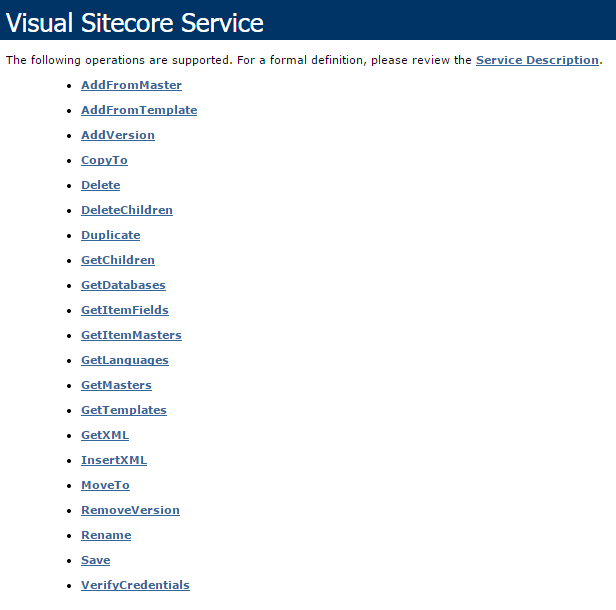
  • Visual Sitecore Service (Good Old Web Service) at /sitecore/shell/WebService/service.asmx
  • Sitecore Web Service 2 (Hard Rock Web Service) at /sitecore/shell/WebService/service2.asmx


Some of the methods purposes are:

Method Name
Purpose
AddFromMaster
To create and item under master item.
AddFromTemplate
To create and item of specified template type.
AddVersion
To create new version of item.
CopyTo
To create copy of existing item.
Delete
To delete and item.
DeleteChildren
To delete children of the specified item.
GetChildren
To retrieve children of item.
GetDatabases
To return list of the database names .
GetItemFields
To returns a list of the fields that this item contains.
GetItemMasters
To return master of the item
GetLanguages
To returns a list of the languages that are set for the entire site.
GetTemplates
To returns a list of the templates in the site.
GetXML
To returns the XML representation of an item.
MoveTo
To move the item under different parent
Rename
To Rename an item
InsertXML
To insert item based on representation
Save
To updates the item based on the representation
VerifyCredentials
To validate user authorization.

Sitecore Databases

Sitecore is 100% Microsoft based, SQL Server, .NET Framework 3.5, and IIS is supported. Sitecore data is stored in multiple databases and itself is made up of three databases and a web application. Sitecore has three default databases and they are core, master and web.

Databases serve following purpose:

Core database :

The core database is used by Sitecore to manage membership, handle system settings and hold the entire configuration for all applications in the CMS. This database can be accessed through the CMS, and you are able to configure any of the settings, override standard functionality, build your own applications, and add buttons and functionality to the ribbon in the editors. The managed website that provides the Sitecore user interfaces accesses the core database and allows the user to view and edit content in the master database by default.

Master database :

The Master database is the authoring database - it contains all versions of any content or assets. CMS user interfaces access the master database by default. The master database is where all the content editor work is done. Whenever a new piece of content is created, edited or deleted it is stored here, including those in preview mode. The master database can have workflow enabled and customized, so sections of the site can be locked down to certain roles, or made to go through an approver or translator before they go live.


Web database :

The web database is the default publishing target database: by default, Sitecore publishes changes from the master database to the web database. It differs from the master database in that it doesn’t contain anything in preview mode and only stores the latest live version of each item. When a content editor publishes some content it is then copied from the master database to the web database.


Access and context:

Databases can be accessed through the Database class. 
To get a reference to a database, use the Factory class

Sitecore.Data.Database master =   Sitecore.Configuration.Factory.GetDatabase("master");

Whenever the user code is invoked by Sitecore, a so called context database is automatically assigned. You can access this database by using the Context class:

  Sitecore.Data.Database current = Sitecore.Context.Database;

A Sitecore database contains data elements called items. Programmatically, the data represented by Items is accessed through the class Item.

  To get an Item from the current context database, you can use

  string itemPath = "/sitecore/content/home"; 
  Sitecore.Data.Items.Item item = Sitecore.Context.Database.Items[itemPath];

The itemPath is the path of Item names leading to a specific Item.
Items can be retrieved using paths or IDs. Languages and versions can also be specified

  Sitecore.Data.ID itemID = Sitecore.Data.ID.Parse( 
    "{110D559F-DEA5-42EA-9C1C-8A5DF7E70EF9}"); 

  Sitecore.Globalization.Language language =  
    Sitecore.Globalization.Language.Predefined.English;
  Sitecore.Data.Version version = Sitecore.Data.Version.Parse(1);  
  Sitecore.Data.Items.Item homeitemlanguage =  
    Sitecore.Context.Database.Items[itemID, language, version];

The data within an Item is organized in named fields. For instance, an Item to be displayed on a web site may contain a title and some text. To access the values of these fields, you can use an indexer on an Item

Sitecore.Data.Items.Item homeitem = Sitecore.Context.Database.Items["/sitecore/content/home"];
string title = item["title"];
string text = item["text"]; 

Sitecore Content Tree

Content Tree:


The Content Tree allows viewing the Sitecore system as a tree with child items grouped under their parents. The Content Tree Structure is displayed by default and contains the hierarchy of folders and content records comprising the site. All the content contained in a Sitecore web application is stored in the content tree, with the Content and Media Library items intended for content editors’ use and the Layouts, System and Templates folders aimed at developers and system administrators. Sitecore considers everything within the content tree an item that can be queried using the API; so all pages are items, as are images, PDFs and so on, meaning they can be easily found using this method.


Top items folders in content tree are:

Content :

The Content item folder is where the pages and data for the website are stored, and the structure of these items represents the structure of the website.

Media Library:

The Media Library, accessed with the Media Browser, is used to manage media files (images, PDFs, documents, audio, video, and multimedia) are stored in the Media Library.

Layout :

The Layout item folder is where all the ‘layouts’ for the web application are declared, referencing the location of the file in the web application root. It also contains ‘sublayouts’; partial files that represent the widgets etc. used to create a page. Layouts are combined with multiple sublayouts to build pages, which means widgets can be reused and content editors can swap out one widget for another without developer intervention.

System :

The System item folder is where standard settings for the content editor and the web application are held. For example, if you wanted to add another language to the web application this is where you would do it.

Templates :

The Templates item folder is a where all the template items are stored for the site. Template items are used to describe objects in Sitecore, and specify what fields that object will contain, the content of any standard values and any layouts that are attached to the item

Sitecore Overview


Sitecore is a one of the leading enterprise-level .NET web content management software. Sitecore gives mid to large size organizations a comprehensive tool with the ability to build, deploy and securely manage business solutions such as web applications, public websites which require CMS (Content Management System) functionality, integration options and scalability.

CMS is a web application designed to make it easy for non-technical users to add, edit and manage a website contents. Some of important features of a CMS like Web-based publishing, format management, revision control, indexing, search, and retrieval.

KEY FEATURES & BENEFITS

Sitecore architecture: Sitecore architecture is nice plug-gable and scalable component based architecture that can essentially be selected, assembled and syndicated across multiple sites. It is written in .Net.

Simple and powerful interface: Sitecore has a powerful and simple end-user interface for content manager as well as for developer. User will feel familiar with interface if he/she has used MS office earlier.

Cutting Edge Technology: Sitecore is completely built on Microsoft .NET technologies, so sites built with Sitecore integration will run in any browser and on any browser-based device. The Sitecore user interface works in Internet Explorer, Mozilla, Firefox and Mac browser, to mobile devices such as iPhone, Android, and Windows Phones,. Dynamic delivery, intelligent caching and ASP .Net delivers pages very quickly. The product is compliant with the Worldwide Consortiums open Internet standards, for example SOAP (Web services), XML and uses the extensible application markup language (XAML) concept.

External Data Integration: Sitecore CMS provides a full data integration and abstraction layer ( Sitecore Data Providers/Importer) that will allow you to connect to any database, Web service or other external systems and access that content.

Improved Search Engine Optimization: Sitecore created the SEO module to improve sites search engine ranking through that not only helps increase Google ranking, but also improve the search experience for visitors of website.

Easily Integrate with Third Party Tools: Sitecore seamlessly integrates with third party tools such as SharePoint, various ERP and CRM systems, Clay Tablet, Google Analytics and many more modules.

Deliver personalized content based on user behavior: Content personalization through Sitecore gives your marketing team the ability to own your customer experience in a much tailored method.

Content management workflow: Sitecore's workflow engine includes versioning, controlled approvals, incremental publishing, notifications and reminders, and archiving capabilities. The document comparison feature allows enhanced version control content, allowing editors and approvers to see exactly what has changed. This feature is also useful when managing content translation processes, highlighting exactly what content has changed and needs to be translated from its source language. Having strong workflow processes ensure your content is the highest quality it can be, and your site delivers the most compelling user experience it can.

Multi-language content support: As more companies expand their reach globally, Sitecore allows editors to work with the CMS in their native languages and provide multi-lingual capabilities based on diverse user audiences. Sitecore also lets you to coordinate the management of the many language versions of your website, as well as the translation processes as content changes.

Rapid Development: Sitecore lets you use the tools you want to use and provides unparalleled support for .NET developers. You can work directly in Sitecore or use external tools such as Microsoft Visual Studio.

Searching: Sitecore exposed search API for CMS item searching. Developer can also easily integrate open source search technology Lucene with CMS. sitecore also provide fast query syntax for faster search.

Security: Sitecore offers an incredible level of security, enabling you to manage content down to their component and element levels. It also provides a sophisticated permission management system to grant rights to users, groups and roles. Sitecore also supports external authentication and authorization systems, and was engineered to plug into existing systems such as CRM solutions to power visitor authentication as well as easily integrating into Active Directory for user management.